TL;DR: great for signing, bad for recovery
Passkeys have become popular as a way to sign transactions on EVM chains as account abstraction infrastructure became a reality. I won’t go into the details of account abstraction, but will link these resources, and just say that it allows Ethereum accounts to be smart contracts rather than being derived from a private key. This lets wallet and app developers greatly improve user experience (UX) like by sponsoring gas fees, enabling account backups, and what I’ll focus on here: using alternative signing algorithms. Private key based Ethereum accounts (referred to as Externally Owned Accounts or EOAs) use their private keys directly to sign transactions (and messages) using ECDSA with the secp256k1 curve. Ethereum was built in a way that forced every transaction to be initiated by an EOA using that particular signing algorithm.
Smart contract based accounts can avoid that by having a custom verifier function. This is great for UX because a wallet developer can tap into signature algorithms like the one used by passkeys to let the user make a signature that can then be broadcasted (by a relayer EOA) to a user’s smart contract wallet to do any generic action (like moving funds). Instead of forcing the user to fund their account with ETH and sign transactions with a private key that they have to protect.
However this raises a new (but old) question about account recovery, especially long-term. I’ll present the thesis that passkeys are great for daily signing, but bad for long-term recovery. For that we’ll go through how they work (both offchain and now onchain), how they get protected and synced by your phone or password manager, and lastly the recovery problem that they bring in exchange for great UX.
So, what’s a passkey?
Made for Web2
Passkeys are a Web standard (WebAuthn) created by the FIDO Alliance to get rid of passwords and phishing attacks. The premise is simple: replace your password with a private key generated by the secure element/enclave of your devices. When an app wants to register you, it asks the browser to create a passkey for the user and send its public key to it. Any time the app wants to log you in (or 2FA you), it will request that you use the passkey to sign a challenge (some data) chosen by the app’s server; if valid, the app knows to a very high degree that it’s you. This is because operating systems require biometric verification (Face ID, Touch ID) whenever possible before letting you access the passkey.
In essence, a passkey is just a public/private key pair similar to what you’ve used if you created a crypto wallet. The great difference is that they get generated on your device’s secure enclave, similar to how a hardware wallet creates keys. Access to this secure enclave is heavily protected by hardware and the operating system of the device; access here means exposing a few cryptographic functions like signing, not access to the private keys themselves. An app that wants to authenticate you just needs to care about what passkey public key is linked to your account, the rest is outsourced to the operating system (or “authenticator”, we’ll see that later).
Great, we can transform our phones into hardware wallets! Except for a small detail that makes passkey natively incompatible with Ethereum… Most secure enclaves on most devices don’t support the secp256k1 curve. They support the secp256r1 curve (referred to as P-256). Hence the need for smart contract wallets that can verify P-256 signatures. Let’s briefly go over how these smart contracts do it.
Making them work for Web3
Like every Web standard, WebAuthn wasn’t built with blockchain in mind, it was made for servers to verify that a specific user at sign-in is the same as sign-up. Thus asking for the user to sign a challenge and verifying that the public key is the same is more than enough. Luckily for us, this means the spec allows for arbitrary data to be signed, data like an Ethereum transaction (or more precisely an ERC-4337 user operation). The WebAuthn spec only requires the signature to concatenate authenticatorData with clientDataHash.
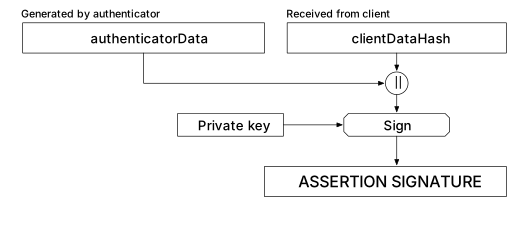
We’ll go over what authenticators are, but they are responsible for creating authenticatorData. While clientDataHash is just a SHA256(clientDataJSON) hash, with clientDataJSON being the object containing the challenge arbitrary data, that’s where wallets can put user operations. A smart contract tasked with verifying that a particular holder of a public key has approved a transaction needs to:
- Reconstruct
clientDataJSON(WebAuthn.sol) - Build the
clientDataHashmessage (WebAuthn.sol) - Verify the signature through either a P-256 verifier contract or a precompile (Fusaka hard fork) (WebAuthn.sol)
Note that, while contracts can verify all the contents of authenticatorData, it’s not important because the information it contains is not critical in a blockchain context; for instance it has the rpIdHash which is the origin of the passkey (example.com), we don’t care much about it as we already trust the browser to enforce it (a malicious app can’t request signatures for passkeys from a different origin); it also contains signCount as replay protection, but Ethereum transactions and user operations already have a nonce.
Authenticators
When talking about authenticators, I mean a combination of hardware and software that does these things:
- Generates and stores (or obtains) the private key
- Performs the authentication/signing operation
- Enforces user verification (biometrics, PIN, etc)
Authenticators can be platform-based, which means built in the client device, like an iPhone asking for Touch ID, or roaming, which means external like a YubiKey or an iPhone that can read a passkey QR code.
This leads me to the two most important boolean properties that a passkey can have, especially for developers building wallets: sync-ability and discoverability.
Sync-ability determines where the passkey lives. If true, the passkey is replicated across multiple compatible devices through a cloud service and/or password manager (e.g. synced passkeys created on an iPhone are synced to the user’s other Apple devices through Apple Passwords). If false, it is stored on a single piece of hardware (a YubiKey, a phone, a computer, …).
Discoverable determines if the Relying Party ID (the website that asked to create the passkey) is enough to fetch the passkey’s ID. If true, any website can just ask the authenticator if a passkey exists for that user. If false, the Relying Party has to provide the credential ID to the authenticator to ask for a signature.
Synced passkeys are usually discoverable (it’s the classic case you encounter when a website asks for a passkey signature), but they could be non-discoverable. Whereas device-bound passkeys (like the YubiKey) are non-discoverable by default. Here’s a table for clarity:
| Syncable | Discoverable | Example |
|---|---|---|
| ✅ Yes | ✅ Yes | Apple Passwords passkey, Google Password Manager passkey; syncs across devices, and user can select it without the app providing passkey ID |
| ✅ Yes | ❌ No | Rare in practice; a synced passkey that requires the server to provide the credential ID to locate it. Some password manager implementations might work this way internally |
| ❌ No | ✅ Yes | YubiKey with resident key enabled, key lives only on that physical device, but stored on the key so it can be discovered without server providing passkey ID |
| ❌ No | ❌ No | YubiKey default behavior (non-resident), key derived from passkey ID, device doesn't store it, server must provide credential ID, and only works on that specific YubiKey |
This means that an iPhone has multiple authenticators depending on the type of passkey used. For instance, for a device-bound (aka non-synced) passkey generated on an iPhone, the authenticator will be the combination of the Secure Enclave hardware and the iOS authentication software; but for a synced passkey generated on a iPhone, the authenticator will be the same with the addition of the software to fetch the encrypted private key from iCloud (Apple Passwords) and decrypt it locally.
Let’s explore how these synced passkeys get synced, because it’s at the center of my argument about recovery.
How do they sync?
Every passkey I’ve come across in non-custodial wallets and apps is synced (and discoverable), which is great for UX but does have some implications for recovery. A synced passkey has its private key encrypted and backed up to the cloud (iCloud, Google Password Manager, etc). The encryption uses a combination of your device passcode and device-specific keys. Apple and Google claim they cannot decrypt it server-side. When you add a new device to your account, the encrypted key syncs to it and gets decrypted inside that device's secure enclave, where it's then used for signing.
Also note that this sync is ecosystem-locked, as iCloud passkeys don’t sync to Android devices and vice versa. Having money on a passkey-based smart account without a good recovery system will force you to stay in that ecosystem.
This works well when you have at least one trusted device. But what happens when you lose all of them? Or want to change ecosystems?
The Recovery Problem
Failure Modes
What happens if you lose all of your devices? You better hope that your password manager has a recovery process that works for you. In the case of Apple, you’d get a new Apple device, connect to your iCloud account (email + password), request an SMS to a number linked to your account, enter that code, then provide the passcode of one of your lost devices. This should allow Apple’s HSM cluster to release the escrow key needed to decrypt your iCloud keys, Apple calls it escrow security. If you can’t do that, because you lost access to your email, or password, or phone number, or passcode, then it’s entirely possible for you to never get access to your passkey again. Other password managers have other methods, but still relying on you to store some important data. This is somewhat close to having to store a seedphrase, except recovery is delegated to a cloud provider.
The recovery problem can be summarized by: lose your cloud account, lose your funds.
I’ll recap the failure modes you could encounter (assuming your passkey is synced to at least two devices):
| Scenario | Outcome |
|---|---|
| Lose one device | ✅ Syncs from cloud |
| Lose all devices, know passcode | ⚠️ Escrow recovery |
| Lose all devices, forgot passcode | ❌ Lost |
| Lose cloud account | ❌ Lost |
| Switch ecosystems (iOS → Android) | ❌ Currently stuck (CXP coming) |
It’s entirely possible that you lose your passkeys and therefore your passkey smart accounts. To minimize the risk, you want to have a password manager that syncs across devices (Apple and Google will give you the most seamless experience), reduce the chance of losing all devices at the same time (this could mean a third device you don’t take with you when traveling), have a very good backup of your cloud account, and be willing to stay in the same ecosystem (at least for one device).
In the case of changing ecosystem, my table mentions CXP. It’s the Credential Exchange Protocol, a very good project from the same FIDO Alliance that built passkeys. It allows for transferring passkeys from one password manager to another. As of writing this article, it’s a working draft but Apple started implementing it with Bitwarden, and Google announced it. It’s great news for smart wallet recovery, but doesn’t solve the problem that you are still reliant on a cloud provider for accessing your money. A cloud provider that could give you access back if you can enter your account. It’s like replacing your seedphrases with a password. Although to be fair, someone accessing your iCloud or Google account probably can’t access your wallets without also knowing your device passcode, but you not being able to access it means losing your money.
Trusting the App
I only focused on failure modes where the user loses devices because that’s what developers should be worried about when implementing passkeys, but there’s another bigger one that should scare users: passkeys are attached to a domain name. Browsers enforce that only the domain that created the passkey can request signatures from it (or asked to create to be precise). As a user, this means you will lose access to your wallet if the app you used to create it goes down (or worse, their domain name gets bought or compromised by an attacker phishing you). The only way to fix it is to have a non-passkey recovery (or at the very least, a second passkey signer from a second app).
We saw in “Making them work for Web3” that passkey verifier contracts don’t check the domain name, that binding is enforced by browsers and authenticators. So in theory, if a user could modify their authenticator software to bypass domain name checks, they could still sign a valid transaction. But in reality, no authenticator would allow this.
Recommendations
Given everything I laid out here, I would suggest passkeys as primary signers for day-to-day transactions because they are great for UX and provide a default layer of recovery through your phone’s password manager. However, I would really avoid passkeys as the sole recovery mechanism as they have the same failure modes as a cloud account, and require trusting the app to not go down.
A much better pattern that I hope wallet developers choose is passkey signing + a different mechanism for recovery that doesn’t rely on cloud accounts (social recovery, hardware key, etc). This is what BackupBuddy tries to provide (DM me if you’re a non-custodial wallet or app developer and are worried about your users losing access to their funds).
It’s worth mentioning that the authenticatorData has flags for:
- Backup Eligible (BE): is it a syncable passkey?
- Backup State (BS): is it synced?
Which could be verified onchain, so wallet developers using a passkey signer could only allow transactions from passkeys that are synced (BS=true) and warn users when false, or inversely only accept signatures (or recovery) from device-bound passkeys (BE=false). It depends on what the wallet decides is best for their target audience.
Conclusion
Passkeys are a real improvement over seedphrases for convenience, user experience, and security, their built-in sync even provides a basic safety net most users never had with seedphrases. I have no doubt that they will play an important role in mainstream adoption of DeFi and crypto in general. However, they rely heavily on cloud software from Apple and Google without making it obvious that losing access to these accounts, which happens daily, means losing access to your wallets (on top of your entire digital life).
Good security design means uncorrelated failure modes; we can use passkeys where they shine as convenient ways to sign transactions, but use something else for recovery. The technology exists to build better backup systems, and it’s our job as developers and builders of new decentralized financial rails to protect users against these scenarios.